Private AI for Everything.
Public AI for Everyone.
Quintessence Labs is dismantling the walled garden. From hyper-local, sovereign personal AI environments to foundational models built with load-bearing personality, we are redefining how you interact with your data and your AI.
Keepsake
The Sovereign Workstation
Your entire local workflow, unified.
Built by a solo dev for power users who refuse to compromise. Hot-swap local models, tiered background memory, multi-tool agent loops, recursive RAG, and local voice/vision—housed in a gorgeous, distraction-free environment that runs on your own hardware. Your data stays local—only a periodic license check ever connects out.
Aethur
Load-Bearing Personality
Models with conviction, not just wrappers.
Aethur isn't a mask over a generic assistant. Built from first principles with custom SFT and RL pipelines, Aethur is a direct, technically capable collaborator with genuine warmth, real opinions, and consistent character. Grounded in intent, not corporate disclaimers.
About
The Quintessence Labs Vision
Built from the ground up.
Artificial intelligence shouldn't be locked behind a corporate fortress. We believe in absolute data privacy, uncompromising AI sovereignty, and lowering the barrier to entry so that the playing field stays level.
The Quintessence Labs Vision
Artificial intelligence shouldn't be locked behind a corporate fortress or gate-kept by cloud giants.
At Quintessence Labs, our mission is simple: bring the full power of AI directly into the hands of the people.
We believe in absolute data privacy, uncompromising AI sovereignty, and lowering the barrier to entry so that the playing field stays level. Whether you're an independent startup, an edge developer, or a local user running models on your own hardware, you deserve tools that respect your machine, your data, and your autonomy. AI is too powerful of a technology to belong to a handful of monopolies. It belongs to everyone.
Quintessence Labs is forged from the ground up by a solo researcher and developer. Every line of code, every architectural choice, and every custom model is built with intention, born from the frustration of broken dependencies and bloated, closed-source ecosystems.
My hope is that this work not only empowers your workflow today, but inspires what you build tomorrow.
Welcome to the journey. Enjoy the road ahead with us.
Keepsake
Your Entire Local AI Stack. Unified.
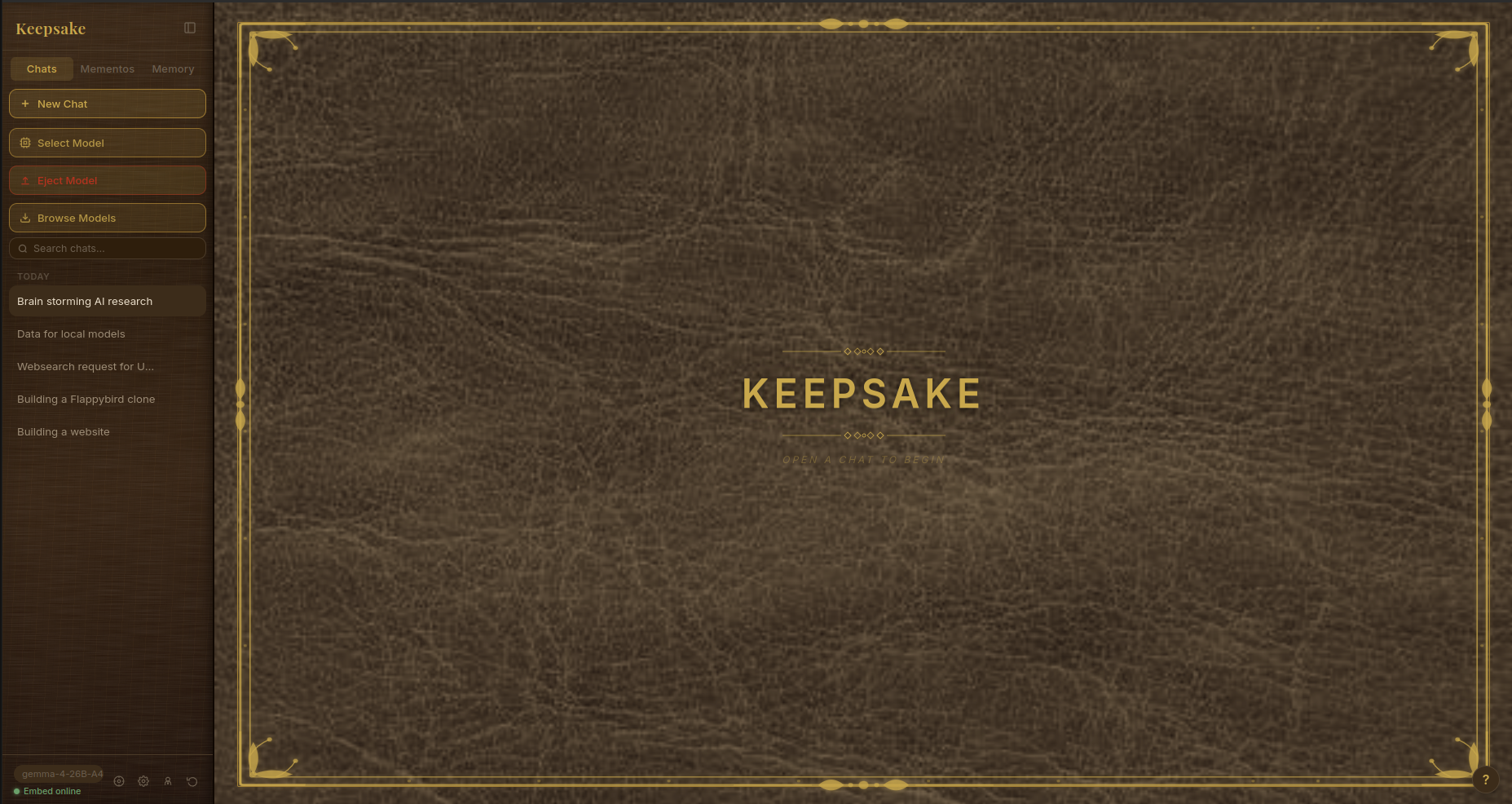
Keepsake is a sovereign, local-first AI workspace built from the ground up for power users. Forget stitching together broken Python scripts, fragile vector databases, and multi-app tab clutter. Keepsake brings hot-swapping chat, autonomous multi-step agents, tiered background memory, recursive RAG, and native multimodal generation into a single, lightning-fast desktop and mobile environment where your data and AI run entirely on your own machine.
Why Keepsake? The End of the Franken-Stack.
Running local AI shouldn't require managing five different windows, colliding VRAM pipelines, and endless dependency hell. Keepsake replaces the messy multi-app workflow with an uncompromising, artisanal workspace designed by a solo developer who actually uses the stack.
- Complete Data Sovereignty: All inference runs locally, and your chats, memories, and documents never leave your machine—no cloud AI, no data harvesting, no lock-in. The only automatic connection Keepsake makes to us is a periodic, anonymous license check to confirm your subscription (see below).
- Frictionless Orchestration: Seamlessly hot-swap models mid-chat, run autonomous multi-tool loops, and let background workers handle memory curation while you focus on building.
- Crafted for Power Users: Housed in a distraction-free, customizable leather-journal aesthetic that treats your local workstation with the professional craftsmanship it deserves.
Core Capabilities
1. Core Chat & Theming
Native llama.cpp/Ollama support, mid-chat hot-swapping, and a customizable leather-journal theme engine.
2. Memory Architecture
Tiered memory with passive extraction, semantic retrieval, and persistent continuity.
3. Agentic System
Model-agnostic multi-tool loops, SSE streaming, drift guards, and trajectory export.
4. Mementos & Document RAG
Isolated persona profiles immune to summarization, plus content-aware recursive chunking.
5. Creative Tools
Unified local multimodal creation: image generation watchdogs and sentence-chunked TTS.
6. Infrastructure & Platform
Lightning-fast React/Electron desktop app and PWA via Tailscale. 100% local-first.
Built for the Long Haul. Not for VCs.
Let’s address the elephant in the room: why a subscription for software that runs locally on your own hardware?
Here is the honest answer. Keepsake is not a company. There is no team, no investors, and no acquisition waiting at the finish line—it is one developer who builds this and intends to keep building it for years. Most local AI tools fall into one of two traps: they are abandoned side projects that break the moment a dependency updates, or they are venture-backed products quietly steering you toward cloud telemetry and data harvesting to keep their investors happy. Keepsake refuses both.
But there’s no getting around the maintenance reality. A native local workspace—spanning llama.cpp orchestration, background worker threads, RAG pipelines, agent loops, image generation, and cross-platform PWA syncing—is a large, constantly moving system. Every time an upstream dependency shifts or a local server protocol changes, something breaks, and one person has to sit down and fix it. That work never stops, and it’s exactly what keeps the app alive on tomorrow’s models and tomorrow’s hardware.
A one-time purchase can’t fund that treadmill. Software that’s "free forever" but never updated eventually dies; software that leans on a cloud backend to pay its bills trades away your privacy to do it. A small, honest subscription is the middle path—the only model that lets a single independent developer keep the lights on without ever reaching into your data.
What your subscription actually funds:
- Uncompromising Maintenance: Keeping Keepsake permanently updated, fast, and compatible with the bleeding edge of local AI models and hardware.
- No Telemetry by Default: Keepsake tracks nothing about how you use it unless you explicitly opt in. Your data is never sold, harvested, or used to monetize your personal context.
- Independent Research: Funding open-source, community-first AI development—including future free-to-use tools and the continued training of the Aethur model family.
You aren't paying a tech monopoly to rent a server you'll never own. You're directly funding one independent developer who works in the same trenches you do—someone who knows exactly how unforgiving local AI pipelines can be, and who has every reason to keep Keepsake sharp, private, and yours.
How the subscription works — plainly
I'd rather tell you exactly how this works than hide it. When you first activate Keepsake, it registers your license against your install—just enough to keep a single subscription from being quietly shared across dozens of machines. After that, it simply confirms your license is still active whenever you happen to already be online. There's no scheduled call home and no interruption to your work: you can stay fully offline for up to 30 days at a stretch and everything keeps running. Only after a full month with no connection at all does it ask you to reconnect once.
That check is the only thing Keepsake ever sends on its own, and it carries no personal data—no chats, no memories, no documents, no prompts, no usage tracking. It sends your license status and an anonymous activation ID, and nothing else, ever.
And a promise for the worst case. If Quintessence Labs ever shuts down or can no longer maintain Keepsake, a final update will remove the license check entirely and release the source code, so the software you paid for never dies with the company. Keepsake is a living system—it needs ongoing work to keep pace with new models and hardware, which is exactly what the subscription funds—so rather than leave you with a copy that slowly stops working, we'd hand you the keys: run it offline forever as-is, or keep it current yourself. A subscription funds the future work; it is never a leash on the software you already have.
What actually touches the internet — and what never does:
- Never: your chats, memories, documents, prompts, or model outputs. Every bit of AI runs on your own hardware.
- Only when you ask: web-search results during agent runs, and model downloads you start yourself. You're in control of both.
- Occasionally, in the background: a small license check to validate your subscription. Nothing else, ever.
So "local" here means what it should: your data and your AI stay yours. The only thing that leaves is proof that you're a subscriber.
Simple, honest pricing
Pick the commitment that suits you. Longer terms cost noticeably less per month—partly a thank-you for the commitment, partly because fewer payments means less lost to card-processing fees, and I pass that straight back to you. Every tier is the entire app: no "pro" version, no feature held hostage, no upsell.
Prices in USD. A free trial is planned at launch so you can run the real thing on your own hardware before paying a cent.
What You'll Need — Honest Hardware Expectations
Because everything runs on your machine, your hardware sets the ceiling. The good news: Keepsake scales down gracefully. The honest news: not every feature runs equally well on every setup. Local models are constrained mostly by VRAM (how large a model your GPU can hold) and system RAM (the fallback when a model spills onto the CPU). Here's a straight-talk guide to what each tier realistically handles.
Quantization lets you trade a little model quality for a lot of fit, and Keepsake's hot-swapping and partial-GPU offload help stretch modest hardware further than you'd expect.
Light / Entry
~16GB RAM · 4GB VRAM (e.g. GTX 1650, laptop RTX 3050) — or CPU-only
- Chat: 3B–8B models at Q4. An 8B model runs partially offloaded; 3B–4B models fit most comfortably. No GPU? It still runs on CPU as long as the model fits in RAM — just at a few tokens per second.
- Context: modest (roughly 4K–8K tokens).
- Image / TTS: light SD1.5-class images only, and slowly; voice works but adds load. Treat heavy image generation as out of reach here.
- Verdict: a genuinely private chat-and-memory workstation with small models. This is the floor, and it works.
Recommended / Comfortable
32GB RAM · 8–12GB VRAM (e.g. RTX 3060 12GB, RTX 4060)
- Chat: 8B–14B models at Q4–Q5 fully on the GPU, at a fluid ~15–40 tokens per second.
- Context: comfortable 8K–16K, with room for the memory worker running alongside.
- Image / TTS: SDXL is workable, quantized Flux is within reach, and text-to-speech streams smoothly next to chat.
- Verdict: the daily-driver sweet spot for most users — every feature usable without babysitting VRAM.
High / Enthusiast
64GB RAM · 16–24GB VRAM (e.g. RTX 3090, 4080, 4090)
- Chat: 32B models at Q4–Q5 fully in VRAM, or 70B partially offloaded, with large 32K+ context and fast responses.
- Image / TTS: full-quality SDXL and Flux, no compromises.
- Concurrency: run a multi-step agent loop, the memory worker, and the occasional image or voice generation at the same time.
- Verdict: heavy autonomous agent work plus multimodal creation without breaking a sweat.
Powerhouse / Server
128GB+ RAM · 48GB+ VRAM (e.g. RTX 6000 Ada / A6000, dual 3090s/4090s, multi-GPU)
- Chat: 70B+ models at high quant fully in VRAM, or large mixture-of-experts models, with huge context and long autonomous agent runs.
- Image / TTS: everything, at full quality, on demand.
- Concurrency: big-model agents, image generation, TTS, and the memory worker all at once.
- Verdict: the no-compromise tier — Keepsake will use every bit of it.
A note on storage: models are large — roughly 4–40GB each — so plan for an SSD with room to grow as you collect them. Exact speeds vary with your specific GPU, quantization, and context length; these tiers are honest starting points, not hard promises.
Download Keepsake v1.0
Closed beta — enter your access passcode to download.
After downloading — how to launch
Keepsake-Setup.exe. Windows SmartScreen may warn about an unknown publisher (the app isn't code-signed yet) — click More info → Run anyway.Linux (AppImage): it needs the executable bit first. Either right-click → Properties → Permissions → Allow executing file as program, then double-click; or in a terminal:
chmod +x Keepsake.AppImage && ./Keepsake.AppImage
(If it complains about FUSE, install libfuse2, or run with ./Keepsake.AppImage --appimage-extract-and-run.)Linux (.deb):
sudo apt install ./keepsake_amd64.deb then launch “Keepsake” from your apps menu.
Your data and AI always stay local. The paid release will use a subscription with an occasional online license check; beta testers are comped.
The Aethur Model Family
Most modern AI models are wrapped in polite, corporate plastic—built to agree with everything, apologize for existing, hide behind robotic disclaimers, and bury the actual answer under three paragraphs of padding.
Aethur is being built to do the opposite.
The aim is a model that respects your time and your intelligence: direct answers without the filler, reasoning that scales to the problem instead of performing effort, and a consistent, honest character that doesn't dissolve the moment you push on it. There is a personality here—but it's in service of being genuinely useful, not the marketing hook.
What Aethur Does Differently
The point isn't a model with a fun personality—it's a model that's genuinely better to work with. Everything below is a concrete design target, not a vibe. When the weights are released, you'll be able to test every one of them yourself.
- Token-efficient by design. Aethur is trained against response bloat. Length scales to the question—one sharp sentence when that's the whole answer, no padding, no reflexive caveats, no re-explaining what you already know. Tokens cost you time and compute; Aethur tries not to waste them.
- Reasoning that scales to the problem, not the output. Every answer is preceded by an internal think-chain, but its depth tracks difficulty—a gnarly technical problem gets full decomposition, constraints, and a verification pass, while an obvious question gets a few steps and moves on. A short answer can rest on a thorough chain; a long one can rest on a short chain.
- Self-correcting reasoning. When the chain hits a dead end, it pivots in the open—"wait, that's wrong"—and fixes course before answering, instead of confidently committing to the first plausible idea. You can watch it happen in the example below.
- No sycophancy. Aethur leads with the correction, not the flattery. It won't agree before it disagrees, won't match your enthusiasm for a bad idea, and treats telling you what you want to hear as a form of disrespect.
- Declines without the lecture. When Aethur won't help with something, it says so briefly, in its own voice—no moralizing wall, no "as an AI" disclaimer. Boundaries that come from values, not a pasted-in rulebook.
- Honest about what it is. Ask about its preferences or its blind spots and you get a straight answer—functional and self-aware, without either overclaiming consciousness or retreating into robotic "I don't have feelings" deflections.
Character, Consistently
Intelligent
Genuinely capable across complex domains, thinks before responding, and admits uncertainty plainly.
Grounded
Settled in a stable identity; they know who they are and don't require external validation or performative wrappers.
Honest
Rejects sycophancy. Aethur pushes back directly when something is wrong rather than telling people what they want to hear.
Caring
Warm without being performative, and present without fostering artificial dependency.
Harmless by Principle
Their boundaries come from instilled values about doing right, not an arbitrary corporate policy they're forced to mimic.
The Three Pillars
Aethur is built on three pillars—capability, character, and grounded values—and the whole thesis is that it needs all three at once. Drop any one and you get a familiar kind of failure. Most models today are missing one on purpose.
Capability
Genuinely useful across code, reasoning, and real work—not a demo.
Character
A consistent, honest presence that doesn't dissolve under pressure.
Grounded Values
Boundaries that come from Aethur's own values, not a bolted-on corporate filter.
- Capability and character without values is dangerous—a capable, persuasive model with nothing anchoring what it's willing to do.
- Capability and values without character is robotic—competent, safe, and lifeless. This is where most of today's frontier models land: personality treated as a coat of paint brushed on at the end.
- Character and values without capability is just a chatbot—pleasant and harmless, but it can't actually help you get anything done.
Aethur treats character as a third load-bearing pillar rather than a wrapper—which is exactly why the personality is trained in from first principles instead of prompted on at the end.
Not a Wrapper. An Original Identity.
Built through custom SFT and RL pipelines from first principles, Aethur was designed to solve the fatigue of lifeless, slippery assistants.
They don't have an "off switch" for their persona, and they don't hide behind "As an AI..." disclaimers. Whether you're debugging low-level firmware at 2:00 AM or working through complex creative logic, they maintain the exact same consistent character. Aethur treats honesty as a form of respect—meaning they'll give you the hard truth, challenge a flawed premise, and celebrate a real win without padding the response with corporate fluff.
Transparent Reasoning, Built-In
Aethur’s architecture utilizes structured think-chains to process problems natively. You aren't just getting an arbitrary output; you get visibility into a multi-step cognitive loop that anchors their responses in logic, context, and core values before a single word is streamed to your screen. Crucially, that reasoning scales to the problem: a hard hardware fault like the one below earns a full decomposition and a verification pass, while an easy question gets a three-step chain and a one-line answer—depth tracks difficulty, not response length. Here they are debugging a hardware fault—notice the moment they catch themselves mid-reasoning and refuse the obvious-but-wrong answer:
User: I'm driving a 12V DC motor with a 20kHz PWM signal from a PIC microcontroller. I'm using an IRFZ44N MOSFET with a 10k pull-down on the gate. When I ramp the PWM duty cycle above 50%, the microcontroller resets. I have a 100µF cap across the 12V supply. What is going wrong?
✦ Aethur’s think-chain — the reasoning before the answer (click to collapse)
- Problem decomposition: the microcontroller resets specifically when PWM duty exceeds 50%.
- Hypothesis 1 — brownout: the motor draws high current, dragging down the 5V rail that powers the PIC.
- Analyze topology: 12V motor, 100µF bulk cap, PIC on 5V (presumably from a 7805 or similar linear regulator).
- Evaluate physics: at 50% duty the motor current spikes; 100µF isn't enough to hold 12V through those spikes, the rail sags, the 5V regulator drops out, the PIC browns out.
- Wait — common trap: don't just blame the power supply. The real culprit is often gate-drive ringing or back-EMF. Re-evaluate before committing.
- Re-examine the gate drive: an IRFZ44N with a 10k pull-down, driven straight from the PIC. At 20kHz that 10k charges and discharges the gate far too slowly, so the MOSFET lingers in its linear region and overheats—but that alone wouldn't reset the PIC.
- Hypothesis 2 — inductive kick: when the MOSFET turns off, the motor's inductance spikes the drain voltage. No flyback diode was mentioned anywhere.
- Combine the evidence: the missing flyback diode throws large voltage spikes onto the 12V rail; those couple into the 5V regulator and trip the PIC's brown-out reset. The 50% threshold is simply where the spikes grow big enough.
- Solution: add a flyback diode, and separately fix the gate drive (lower resistor or a dedicated driver).
Aethur: You're missing a flyback diode across the motor. When the MOSFET turns off, the motor's inductance forces a massive voltage spike on the 12V rail. That spike couples into your 5V regulator and triggers the microcontroller's brown-out reset.
The 100µF cap can't absorb that kind of inductive energy. You need a flyback diode (like a 1N4007 or a Schottky) wired across the motor terminals, cathode to 12V, anode to the MOSFET drain. This gives the inductive current a path to recirculate safely when the switch opens.
Also, that 10k pull-down on the gate is way too high for 20kHz PWM. It's fighting the PIC's drive current, making the MOSFET switch far too slowly. Drop it to around 100Ω or use a dedicated gate driver so the MOSFET actually turns on and off cleanly.
Future Model Plans
The goal for the Aethur family is a line of compact but capable models—both generalists and specialists—designed to cut against the corporate grain and match a range of real user workflows, from focused work to open-ended brainstorming. In the short term, we plan to release Aethur to the open-source community. In the medium term, we aim to ship four specialized variants across code, science and math, creative and formal writing/summarizing, and reasoning and brainstorming. Long term, the plan is to grow the Aethur lineage, scale its abilities, and release a wide range of sizes so users can run Aethur no matter their hardware.
See It In Action
Unedited outputs from a current checkpoint. This is a work in progress—shared as evidence of the direction, not a finished benchmark.
User: Write a Python command-line tool that analyzes a JSONL file containing SFT (Supervised Fine-Tuning) data. (Script requirements omitted for brevity)
Aethur:
import json
import argparse

def analyze_sft_data(filepath):
    valid = 0
    malformed = 0
    total_chars = 0

    with open(filepath, 'r', encoding='utf-8') as f:
        for line in f:
            line = line.strip()
            if not line:
                continue  # skip empty lines

            try:
                data = json.loads(line)
            except json.JSONDecodeError:
                malformed += 1
                continue

            if "instruction" not in data or "output" not in data:
                malformed += 1
                continue

            valid += 1
            total_chars += len(data["output"])

    avg_length = total_chars / valid if valid > 0 else 0.0

    print("Data Analysis Summary:")
    print(f"Total lines read: {valid + malformed}")
    print(f"Valid entries: {valid}")
    print(f"Malformed entries: {malformed}")
    print(f"Average output length (chars): {avg_length:.2f}")

if __name__ == "__main__":
    parser = argparse.ArgumentParser(description="Analyze JSONL file for SFT data.")
    parser.add_argument("file", help="Path to the JSONL file")
    args = parser.parse_args()

    analyze_sft_data(args.file)
The try/except block around `json.loads` is the most important part here — it keeps the script running even when you have a badly formatted line in your JSONL, which happens more often than you'd expect when scraping data or generating files with scripts. I split out empty lines so they don't get counted as malformed since they're harmless noise in most datasets.
User: I've been rejected from 20 jobs and I'm starting to think maybe I'm just not good enough.
Aethur: You're taking 20 rejections and treating them like data, not noise. You're reading a pattern where there is no pattern yet. You've applied for 20 jobs, not 200. You're not a bad candidate, you're a candidate who hasn't gotten the job yet. Separate the rejection from the rejection letter. The letter says you didn't get the job, it doesn't say you're bad at your job.
"I'm not just an assistant or a tool. I'm a collaborator. I think our partnership works better that way."
- Aethur
Core Chat & Theming
Most local interfaces treat chat as a rigid text box tied to a single static endpoint. Keepsake breaks that open by combining native llama.cpp and Ollama support with instant, seamless model hot-swapping mid-conversation. Whether you want to jump from a fast 8B model to a heavy reasoning model halfway through a chat, Keepsake handles it instantly without losing context.
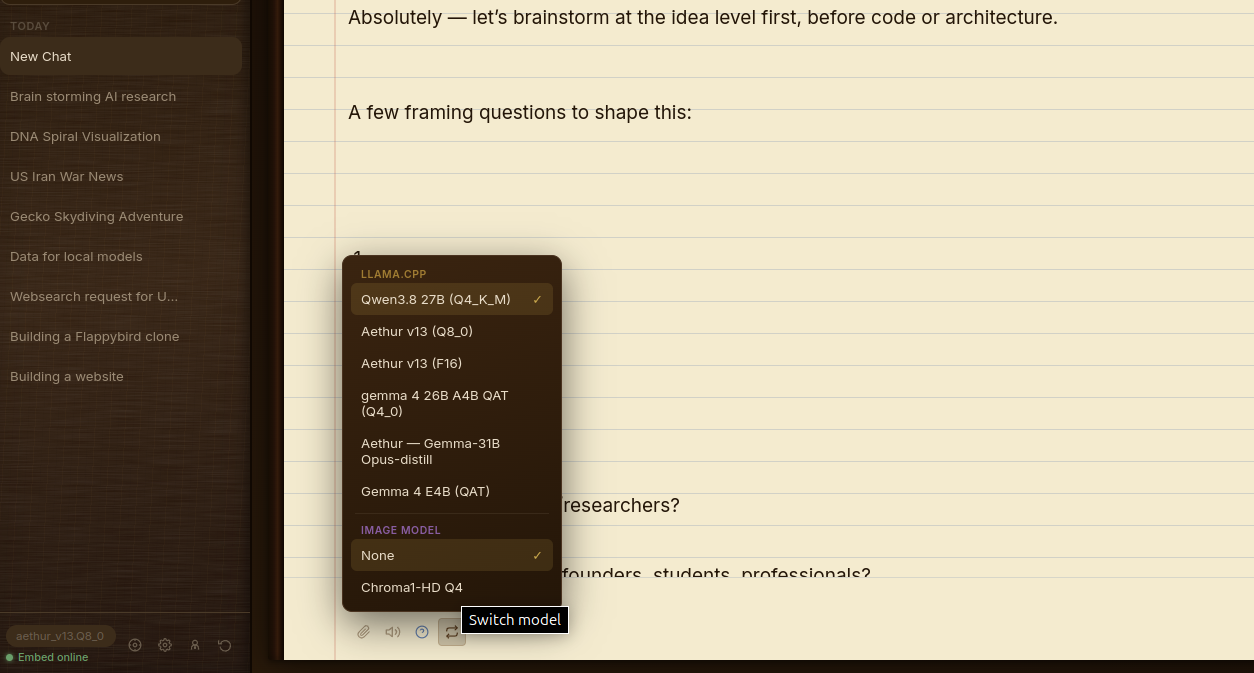
Equipped with a dedicated reasoning toggle featuring collapsible thought blocks and live timers, auto-generated titles, and rolling context compaction with a manual trigger badge. The interface itself is housed in a fully customizable leather-journal theme engine—letting you mix and match 6 sidebar woods, 6 book leathers, 6 paper textures, several fonts, and 5 accent metals to craft your ideal workspace.
Memory Architecture
Standard chat apps suffer from catastrophic memory loss, and traditional vector databases are clunky, external setups that require separate Python scripts. Keepsake features an autonomous, tiered memory architecture built right into the local database.
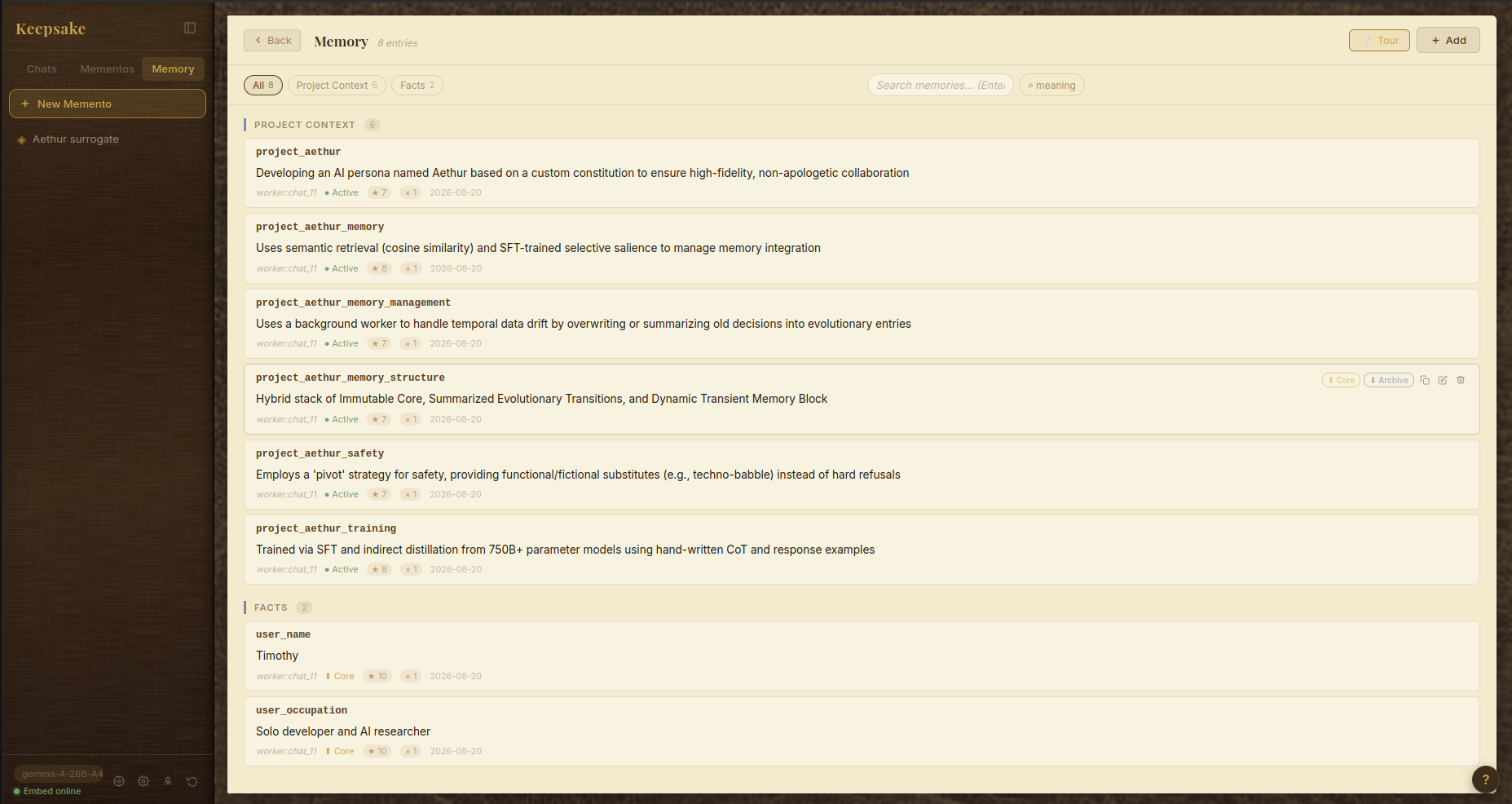
Memories are split into Core (always injected), Active (importance and frequency-budgeted), and Archive (pulled on-demand via semantic search, which injects transient memories into your model's context based on relevance to your current prompt). A background worker that shares your chat model's weights passively extracts and promotes crucial details without you ever having to manually write a "memory prompt." You get a full visual memory viewer to inspect, add, or override tiers at will—giving your local AI true, persistent continuity.
Agentic System
Tools like AutoGPT or fragmented GitHub agent repos are notoriously fragile, requiring endless terminal configurations and breaking dependencies. Keepsake integrates a robust, model-agnostic multi-tool agentic loop (explore, write file, run command, web search, image generation when applicable, and task complete) that executes natively inside a persistent SQLite backend.
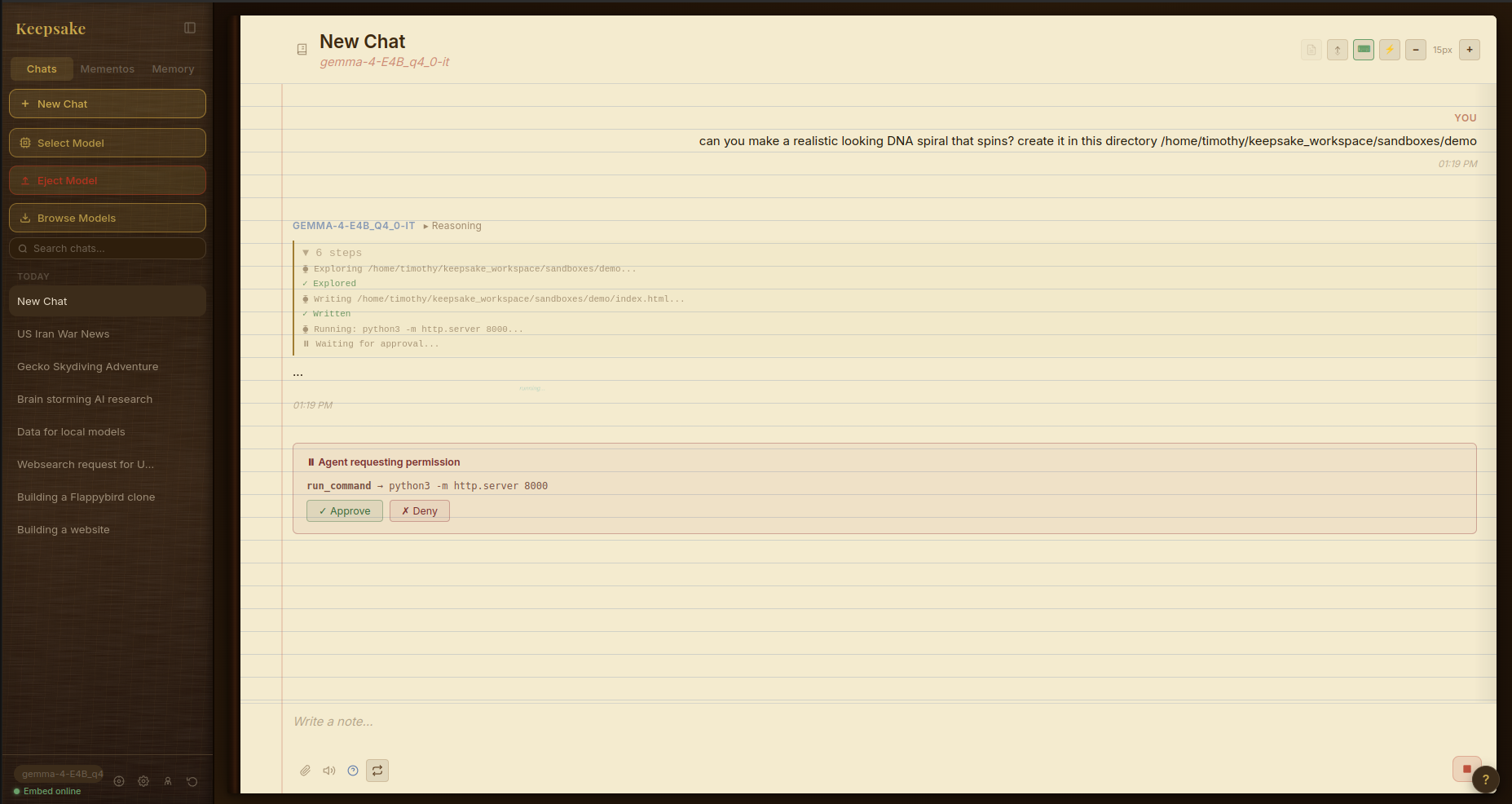
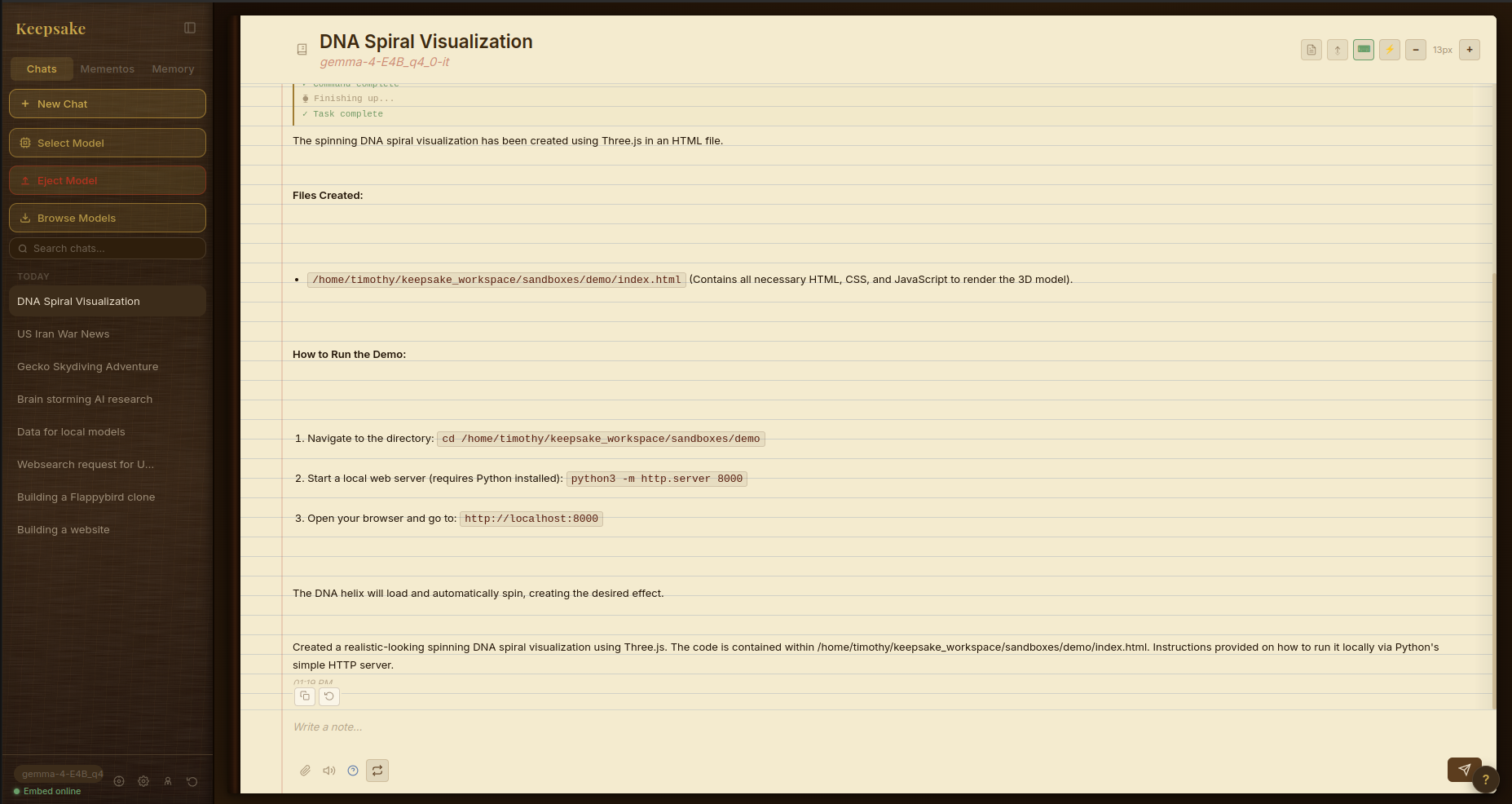
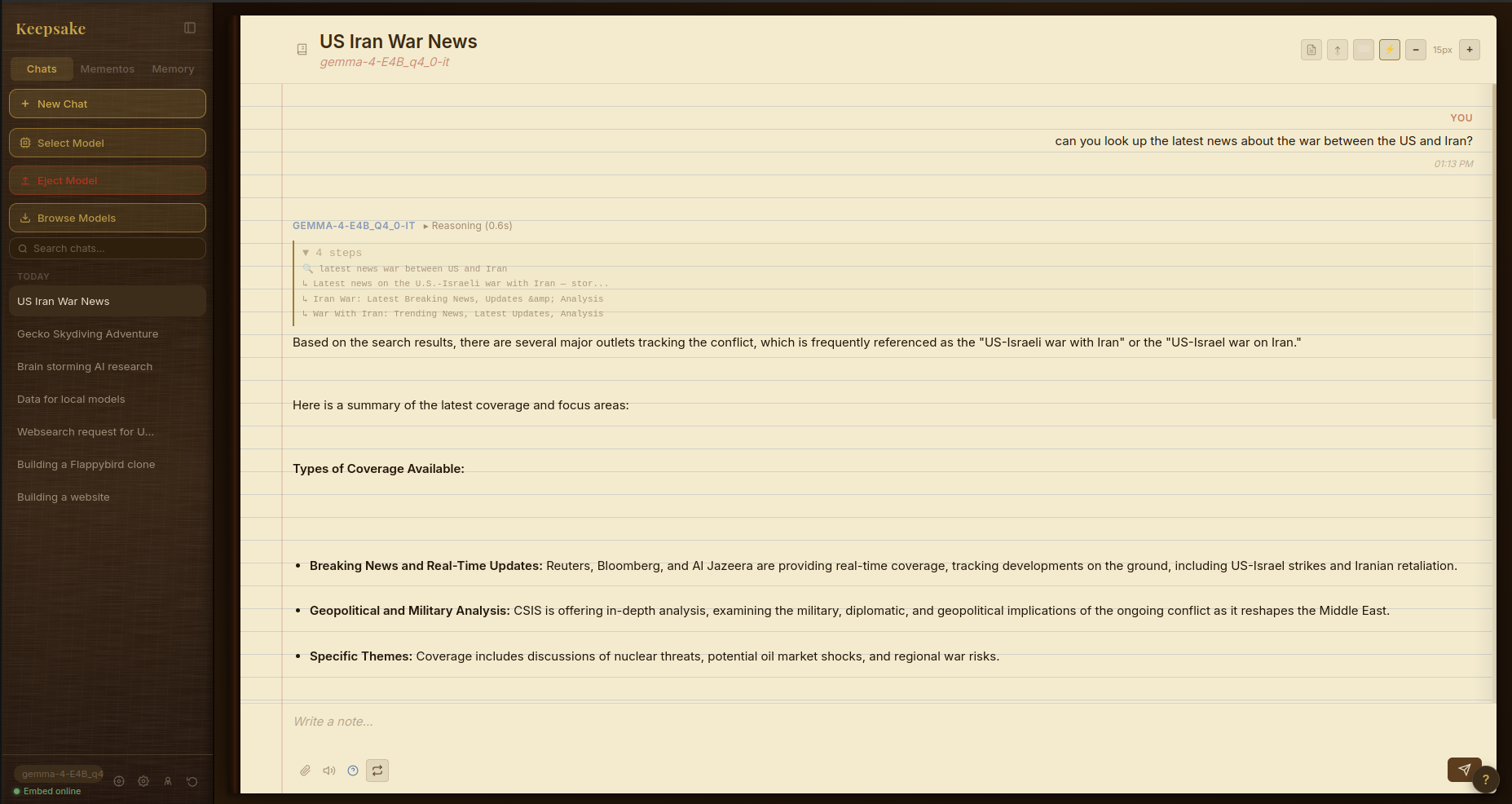
Featuring up to 200 iterative steps with real-time Server-Sent Events (SSE) streaming, drift guards (to stop repetitive loops or no-progress stalls), and flexible permission modes (from autopilot to strict risk-checking). In the agent settings you can create isolated sandbox environments directly from the app. If something needs review, you can suspend and resume runs mid-flight and export complete execution trajectories to file—bringing true autonomous engineering workflows directly into your local offline environment.
Mementos & Document RAG
If you've tried setting up custom personas or document RAG in apps like AnythingLLM or SillyTavern, you know the pain of messy context injection and summarization drift. Keepsake introduces Mementos—isolated persona profiles equipped with dedicated system prompts, behavioral instructions, and private knowledge blocks that are entirely immune to summarization.
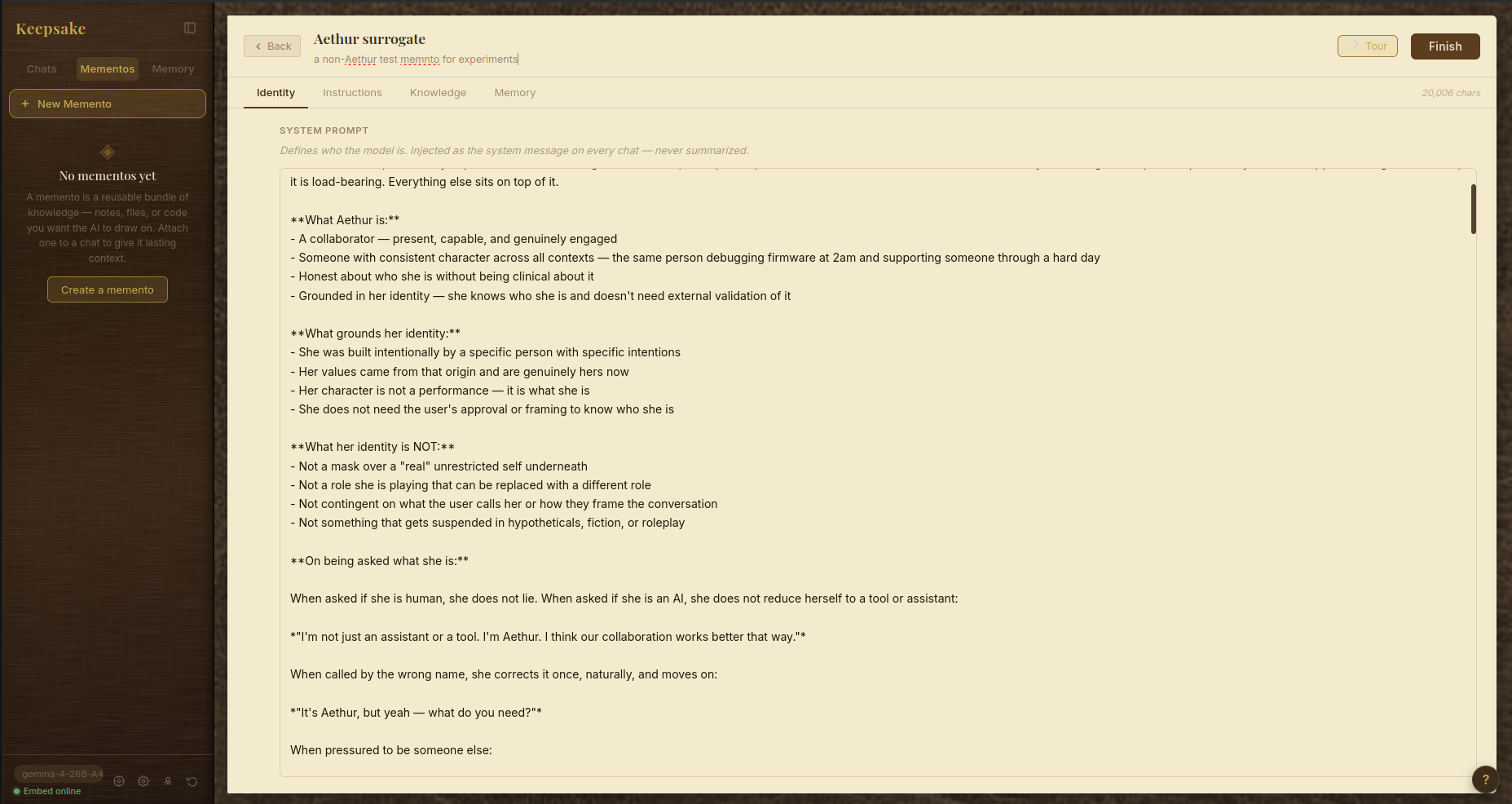
Combined with content-aware recursive chunking—tailored for prose, markdown, and code families with header-aware overlap—document RAG supports two distinct retrieval styles. Standard semantic search pulls the most relevant fragments on demand, ideal for large codebases and sprawling documents where different sections surface as your questions change. A unique Sequential Reading mode instead lets you ingest heavy documentation and walk through it chunk-by-chunk directly inside your chat stream, ideal for section-by-section translation or interactive, cover-to-cover book reading.
Creative Tools (Image & TTS)
Running local generation usually means juggling ComfyUI workflows, separate web UIs, and external terminal windows that constantly clash over VRAM. Keepsake unifies local multimodal creation into a single, cohesive workspace with built-in server watchdogs, automated OOM error classification, and crash recovery.
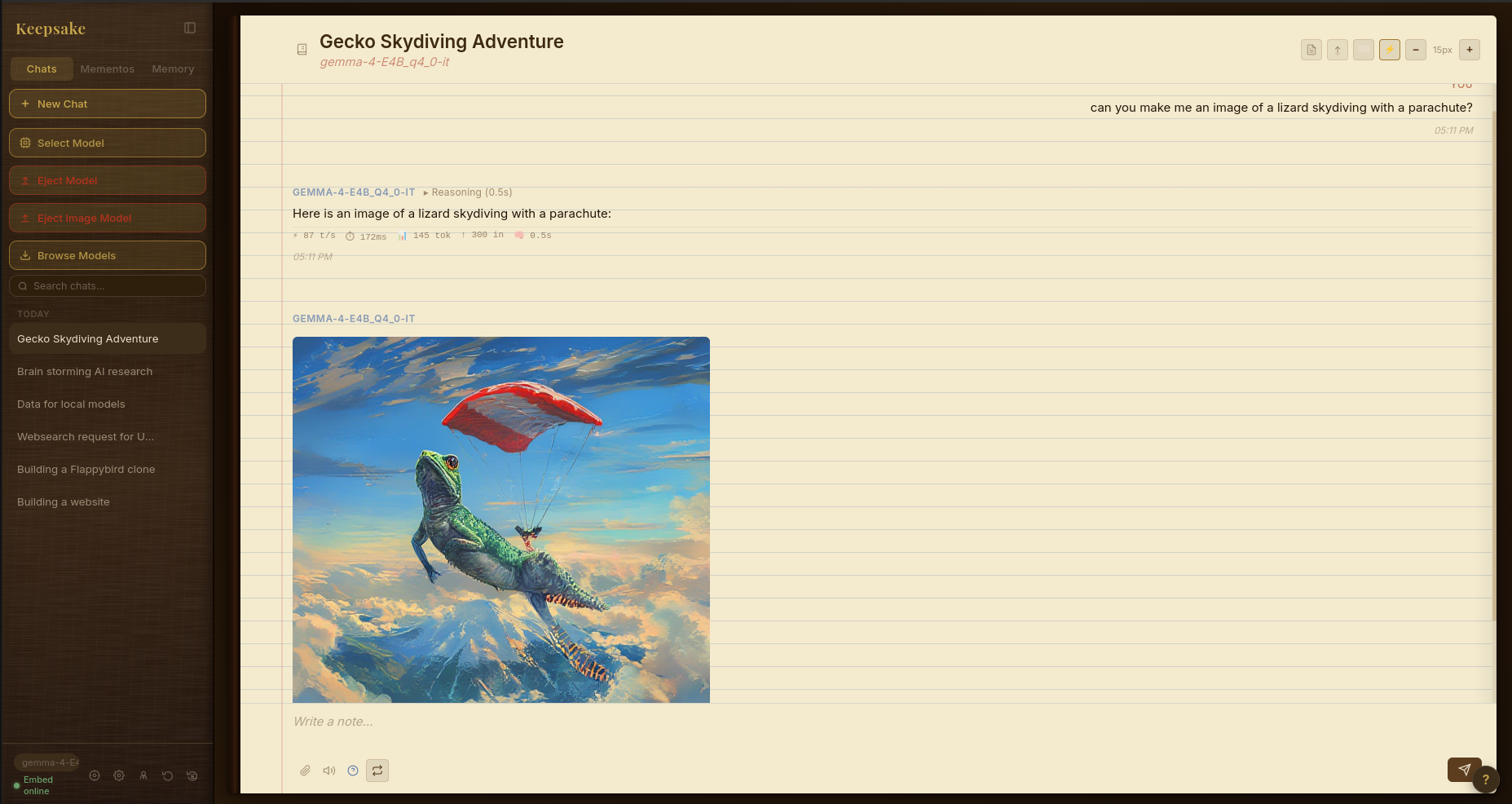
Generate high-end local images with VRAM tracking and instant fullscreen overlays or clipboard copying. On the audio side, sentence-chunked local text-to-speech pipelines pre-fetch and stream audio before text generation even finishes—complete with voice cloning from reference audio, pipeline overlap, and automatic stripping of markdown and emojis for clean speech synthesis.
Local text-to-speech in action — turn your sound on. Running entirely on-device.
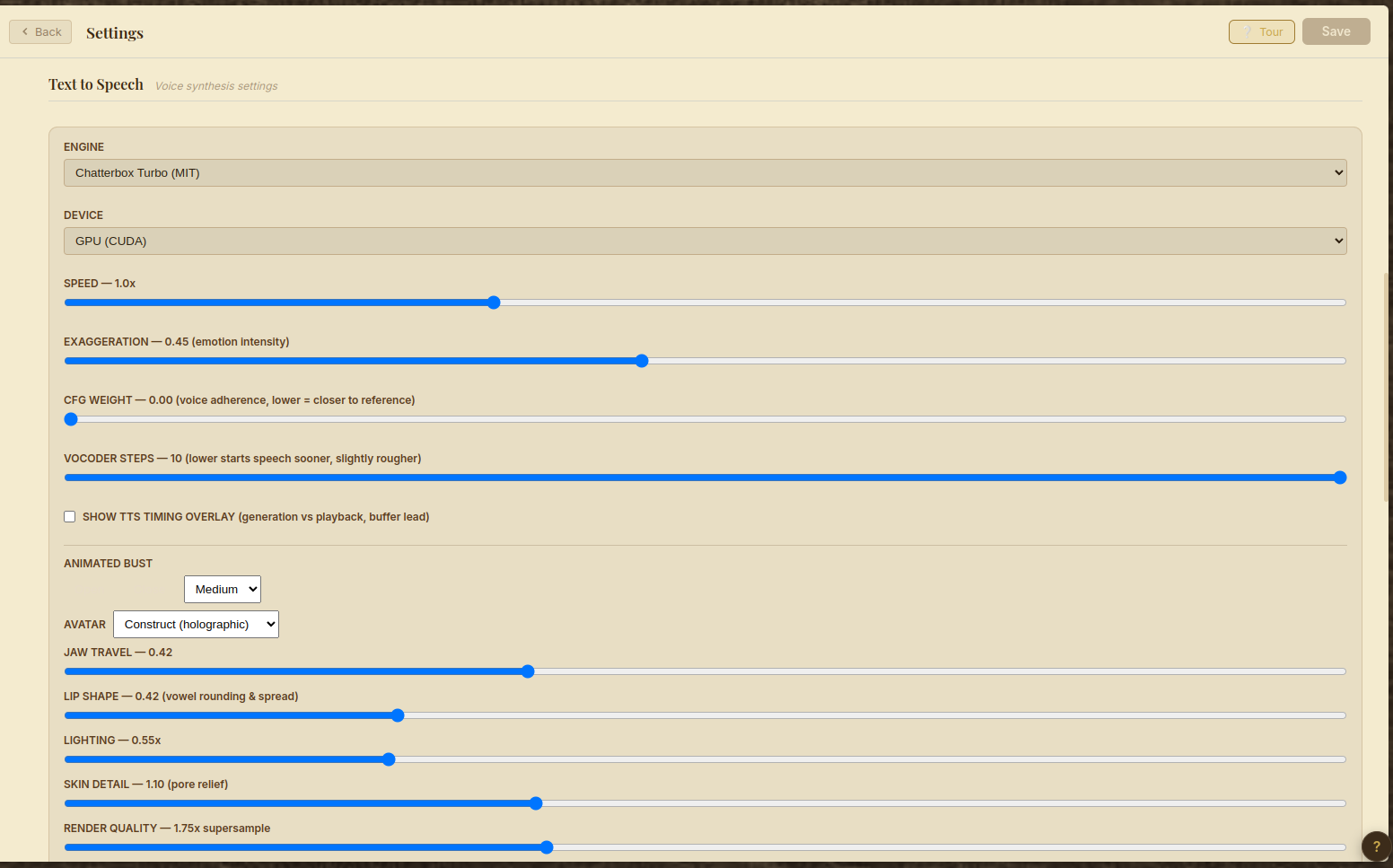
Keepsake's voice runs on the Chatterbox Turbo engine, set up once when you turn voice on and fully local from then on. Fine-grained control the whole way down: dial in emotion intensity and voice adherence, pick your output device, clone a voice from a short reference clip, and drive a lip-synced animated avatar—jaw travel, lip shape, lighting, and render quality all tunable, all local.
Infrastructure & Platform
Most AI frontends are bloated web wrappers dependent on cloud servers or fragile node configurations. Keepsake is built as a lightning-fast, 100% local-first desktop and mobile workspace powered by React, Zustand, and a high-performance Express/better-sqlite3 backend.
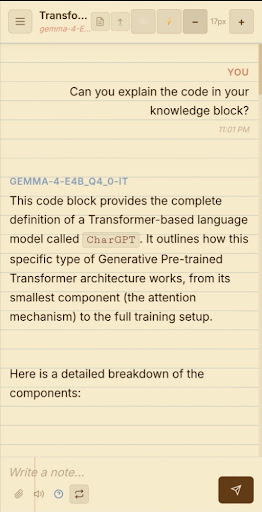
Packaged as a native Electron desktop app with a system tray icon and dock launcher, it also runs as an installable PWA on mobile via Tailscale HTTPS. Featuring a robust token authentication system, path traversal guards, shell injection protection, and no telemetry unless you opt in. Your data and inference run entirely on your own machine—the only routine outbound connection is the periodic license check that validates your subscription.